示範:在策略中啟用 Web Reputation
6-Cloud One Workload Security Technical Essentials:阻擋惡意網站
Web Reputation 防護概觀
Web Reputation 模組會阻擋對惡意 URL 的存取,協助保護伺服器免受網站威脅。
Agent 會查詢 Smart Protection Network 提供的網站信譽資訊,以判斷正在存取的網站是否具有風險。Smart Protection Network 會彙整多種來源的網站資料,其中包括從惡意程式分析取得的 URL。
Agent 會根據網站風險等級與策略設定的 Security Level,決定允許或阻擋該 URL。
Web Reputation 防護可在策略階層的任何層級啟用。未自行覆寫該設定的子策略,會繼承上層策略的 Web Reputation 狀態及相關設定。
網站風險等級與 Security Level
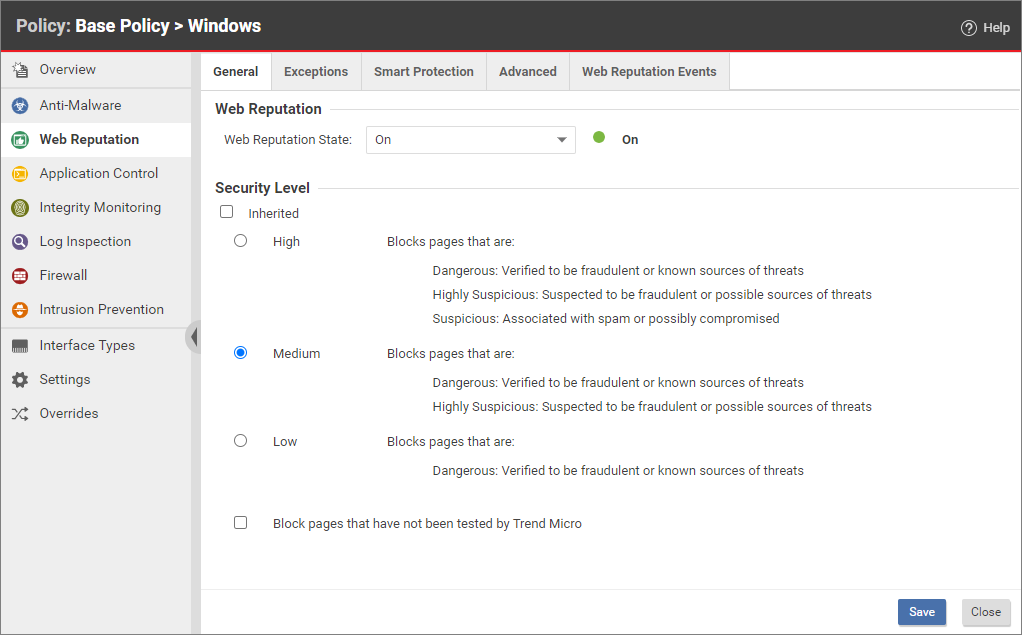
管理員可在策略的 Web Reputation 模組中,從 General 分頁設定 Security Level,決定要阻擋哪些風險等級的網站。Web Reputation 使用下列網站風險等級:
| 風險等級 | 說明 |
|---|---|
| Dangerous | 已確認為詐騙網站或已知威脅來源。 |
| Highly Suspicious | 疑似詐騙網站或可能的威脅來源。 |
| Suspicious | 與垃圾郵件相關或可能已遭入侵。 |
Security Level 與阻擋範圍的對應關係如下:
- High:阻擋 Dangerous、Highly Suspicious 及 Suspicious 網站。
- Medium:阻擋 Dangerous 及 Highly Suspicious 網站。
- Low:只阻擋 Dangerous 網站。
Security Level 越高,網站威脅偵測率也越高,但同時可能增加誤判。是否阻擋未經趨勢科技測試的網站,則另由 Block pages that have not been tested by Trend Micro 控制。詳細資訊請參閱設定 Web Reputation。
定義 URL 例外
例外可覆寫 Smart Protection Network 提供的網站風險判定。管理員可在 Web Reputation 的 Exceptions 分頁中,將 URL 加入 Allowed 或 Blocked 清單。
Allowed 清單
Allowed 清單中的 URL 一律可以存取,不受網站風險等級影響。您可以一次新增多個 URL,但每個 URL 必須各占一行。新增 URL 時,可選擇允許相同網域中的所有 URL,或只允許特定 URL。
- Allow URLs from the domain:允許網域中的所有頁面,並支援子網域。輸入項目只需填入網域名稱;若要限定子網域,也可以填入子網域名稱。例如,
example.com和another.example.com都是有效項目。 - Allow the URL:允許輸入的 URL,並支援萬用字元。例如,
example.com/shopping/coats.html和example.com/shopping/*都是有效項目。
Blocked 清單
Blocked 清單中的 URL 一律遭到阻擋,不受網站風險等級影響。您可以一次新增多個 URL 或關鍵字,但每個項目必須各占一行。
- Block URLs from the domain:阻擋網域中的所有頁面,並支援子網域。輸入項目只需填入網域名稱;若要限定子網域,也可以填入子網域名稱。例如,
example.com和another.example.com都是有效項目。 - Block the URL:阻擋輸入的 URL,並支援萬用字元。例如,
example.com/shopping/coats.html和example.com/shopping/*都是有效項目。 - Block URLs containing this keyword:阻擋任何包含所列關鍵字的 URL。
Allowed 清單的優先順序高於 Blocked 清單。若同一個 URL 同時符合兩個清單中的項目,Agent 會允許存取。
Smart Protection 來源
若要直接連線至 Global Smart Protection Service,請在 Web Reputation 的 Smart Protection 分頁選取 Connect directly to Global Smart Protection Service。
若需要本機 Web Reputation 服務,請使用 TrendAI Vision One Service Gateway 所提供的 Smart Protection Services:
- 在 TrendAI Vision One Service Gateway 上啟用 Smart Protection Services。
- 從 Service Gateway 取得 Web Reputation Server URL。
- 在 Workload Security 主控台開啟目標策略,前往 Web Reputation > General,確認 Web Reputation State 為 On。
- 在 Smart Protection 分頁選取 Use locally installed Smart Protection Server。
- 輸入 Service Gateway 提供的 Web Reputation Server URL,按一下 Add,再按一下 Save。
獨立部署的 Smart Protection Server 已於 2024 年 6 月 30 日停止支援,不應再作為現行或替代部署方式。詳細資訊請參閱 Smart Protection Server EOL 公告及整合 Service Gateway Smart Protection Services。
示範:在策略中啟用 Web Reputation
以下影片示範如何在策略中啟用 Web Reputation 防護。
注意
影片保留錄製當時的網站信譽分數及 Smart Protection 畫面。現行 Web Reputation 行為請以前述的網站風險等級及 Smart Protection 來源說明為準。