啟用 Agent 自我防護
啟用 Agent 自我防護
您可以在 Deep Security Manager Web 主控台中啟用 Agent 自我防護設定,防止 Windows 電腦上的 Deep Security Agent 遭到變更。啟用後,只要有使用者嘗試竄改 Agent,畫面就會顯示 Removal or modification of this application is prohibited by its security settings 訊息並封鎖該操作。
以下以 Windows Agent 為例,說明自我防護涵蓋的項目:
- 防止使用者停止 Agent 服務
- 防止使用者解除安裝或卸載 Agent
- 防止使用者修改與 Agent 相關的檔案
- 防止使用者修改與 Agent 相關的 Windows 登錄項目
在 Windows 上,必須同時啟用 Anti-Malware,Agent Self Protection 才能防止使用者停止 Agent 服務,以及修改 Agent 相關檔案與 Windows 登錄項目。
若要更新或解除安裝 Agent 或 Relay,或建立支援用的診斷套件,您必須暫時停用 Agent 自我防護。您可以透過 Web 主控台,或 Agent 電腦上的命令列來設定 Agent 自我防護。
透過 Policy 編輯器設定自我防護。點擊 Settings > General。在 Agent Self Protection 區段中,將 Prevent local end-users from uninstalling, stopping, or otherwise modifying the Agent 設為 Yes。Local override requires password 設為 Yes,並輸入覆寫密碼。
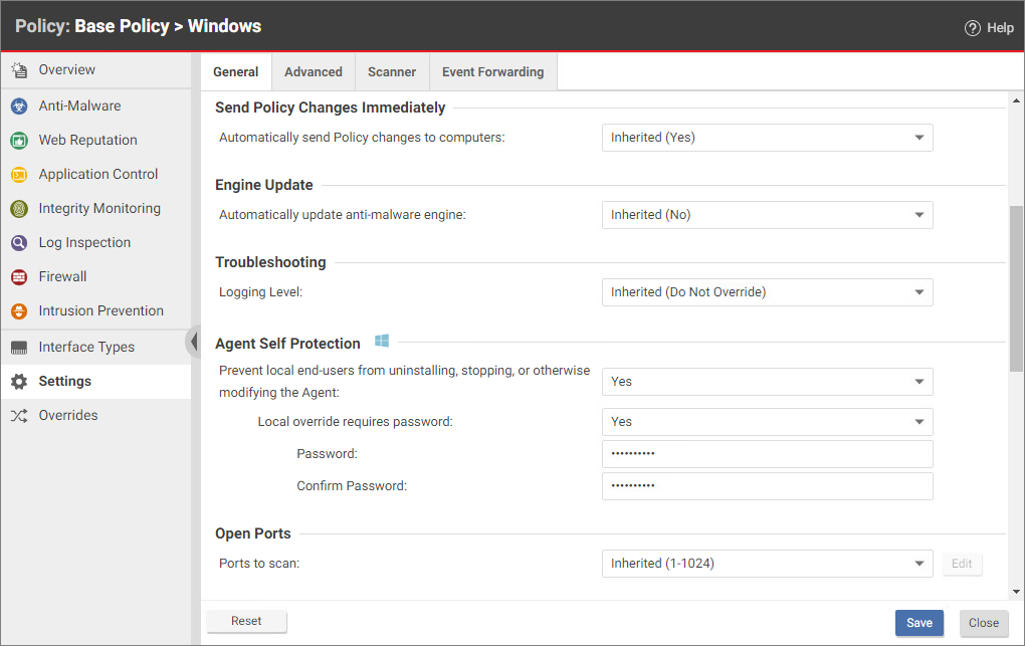
版本說明: Agent 自我防護支援 Windows 與 Linux;Linux 需 Deep Security Agent 20.0.0-5953 以上版本,且至少啟用 Anti-Malware、Application Control 或具備即時監控的 Integrity Monitoring 其中一項。教材畫面以 Windows 版本呈現,各平台的防護條件請參考Agent 自我防護說明。
建議在 Deep Security Manager 設定覆寫密碼,以防止未經授權使用 dsa_control。設定後,除 -a、-x、-y 外,執行 dsa_control 命令時須透過 -p 或 --passwd= 提供既有密碼;這些參數用於驗證,不會建立或變更密碼。
您可以透過命令列啟用與停用自我防護;若已設定覆寫密碼,須以 -p 或 --passwd= 提供既有密碼。命令列無法建立或設定覆寫密碼,該密碼須由 Deep Security Manager Web 主控台設定。以下以 Windows Agent 為例:以系統管理員身分開啟命令提示字元,並切換至 Agent 安裝資料夾;若已設定密碼,啟用範例也須加上 -p <password>。
dsa_control --selfprotect=1
dsa_control --selfprotect=0 -p <password>
其中 -p <password> 為先前在 Web 主控台中指定的覆寫密碼(若有設定)。