Deep Security Agent
Deep Security Agent
Agent 元件
初次安裝時,Agent 不會內含任何防護模組;系統只有在您透過策略啟用防護後,才會安裝該防護模組,且僅安裝執行該策略所需的模組與功能。Agent 由兩大部分組成:
Agent Core
Agent Core 提供在系統上啟動、並與 Deep Security 建立通訊所需的最小化架構,以及平台公用程式、組態管理等主要功能。其程式碼僅涵蓋兩項用途:與 Deep Security 通訊,以及下載並安裝所需的功能。
Agent Features
Agent Features 是可下載的元件,依所啟用的防護功能提供對應的高階功能,也包括 Relay 等 Agent 變體。系統會依安裝的功能,另外安裝實作該功能所需的外掛程式或元件。請注意,功能安裝後可以停用,但無法解除安裝。
系統需求
Agent 必須安裝在受保護的電腦上,才能套用您在防護模組中設定的防護規則。Agent 需求包括:
作業系統
注意: 下列為 2026 年 7 月查詢 Deep Security 20 官方說明文件 當下支援 Agent 的作業系統清單。
- Windows 7、8、8.1、10、11、Server 2008 R2、Server 2012、Server 2012 R2、Server 2016、Server 2019、Server 2022 與 Server 2025
- Red Hat Enterprise Linux 6、7、8、9 與 10
- Ubuntu 16.04、18.04、20.04、22.04 與 24.04
- CentOS 6、7 與 8
- Debian 8、9、10、11、12 與 13
- Amazon Linux 與 Amazon Linux 2
- Oracle Linux 6、7、8、9 與 10
- SUSE Linux Enterprise Server 11、12、15 與 16
- CloudLinux 7 與 8
- AlmaLinux 8 與 9
- Rocky Linux 8、9 與 10
- Solaris 10 與 11
- AIX 6.1、7.1、7.2 與 7.3(AIX 5 已不在現行支援清單中)
記憶體與磁碟空間
注意: 下列為 2026 年 7 月查詢 Deep Security 20 官方說明文件 當下的記憶體與磁碟空間需求,與課程原文數值略有差異(Relay 磁碟空間現行為 30 GB,非 300 GB;Linux 所有防護最低 RAM 現行為 2 GB,非 1 GB)。
| 平台 | 啟用的功能 | 最低 RAM | 建議 RAM | 最低磁碟空間 |
|---|---|---|---|---|
| Windows | 所有防護 | 2 GB | 4 GB | 1 GB |
| Windows | 僅 Relay | 2 GB | 4 GB | 30 GB |
| Linux | 所有防護 | 2 GB | 5 GB | 1 GB |
| Linux | 僅 Relay | 2 GB | 4 GB | 30 GB |
部分作業系統版本可能只需較少 RAM;若未啟用所有防護功能,需求也可能較低。若在許多不同平台上安裝 Agent,Relay 可能需要更多磁碟空間。
部署 Deep Security Agent
初次安裝 Deep Security Agent 軟體時,只會啟用核心功能。在您透過指派策略於 Deep Security Agent 上啟用防護之前,不會安裝任何防護模組。當防護模組啟用後,系統會安裝該模組所需的所有外掛程式或元件。
在伺服器上部署 Deep Security Agent 涉及下列步驟:
步驟 1
將所需作業系統的 Deep Security Agent 軟體套件匯入 Deep Security Manager。
步驟 2
使用下列其中一種方式安裝 Deep Security Agent:
- 手動安裝
- 使用腳本安裝
- 使用 Microsoft Installer 安裝
步驟 3
將受保護的伺服器新增至 Computers 清單。
步驟 4
在受保護的伺服器上啟用 Deep Security Agent。
注意: 依安裝 Deep Security Agent 所採用的方式,將伺服器新增至 Computers 清單與啟用 Agent 這兩個步驟,可能會在安裝過程中自動完成。
將 Deep Security Agent 軟體匯入 Deep Security Manager
在將 Deep Security Agent 軟體套件(包含所有防護模組功能、外掛程式與篩選器)安裝到電腦之前,先將其匯入 Deep Security Manager,可簡化啟用該模組所需外掛程式與元件的流程。匯入 Deep Security Agent 軟體套件,也方便您透過 Deep Security Manager Web 主控台從套件中擷取 Deep Security Agent 安裝程式。
將 Agent 軟體套件匯入 Deep Security Manager 的流程包括下列步驟:
步驟 1
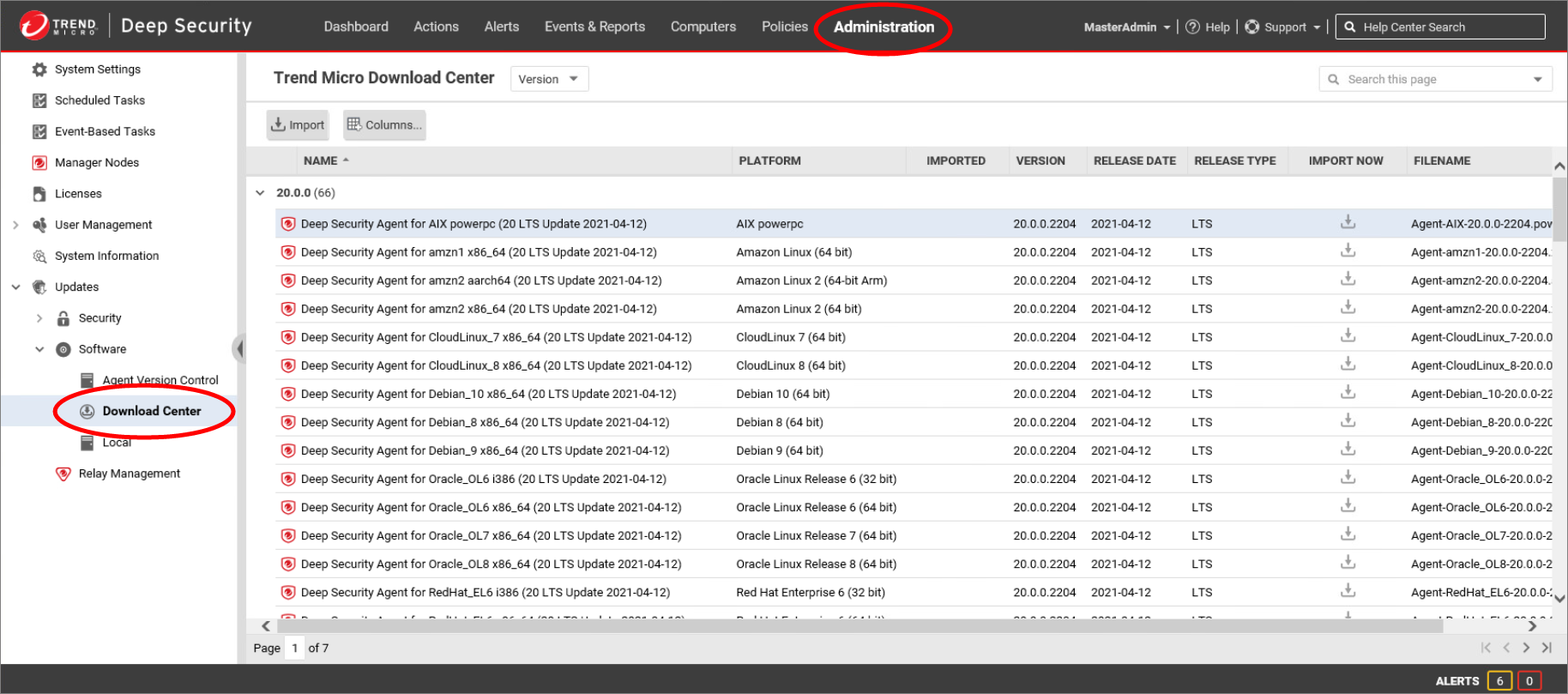
在 Deep Security Manager Web 主控台中,點擊 Administration 選單。在左側窗格中展開 Updates > Software > Download Center。Trend Micro Download Center 頁面會顯示趨勢科技提供的所有 Deep Security Agent 軟體的最新版本。
步驟 2
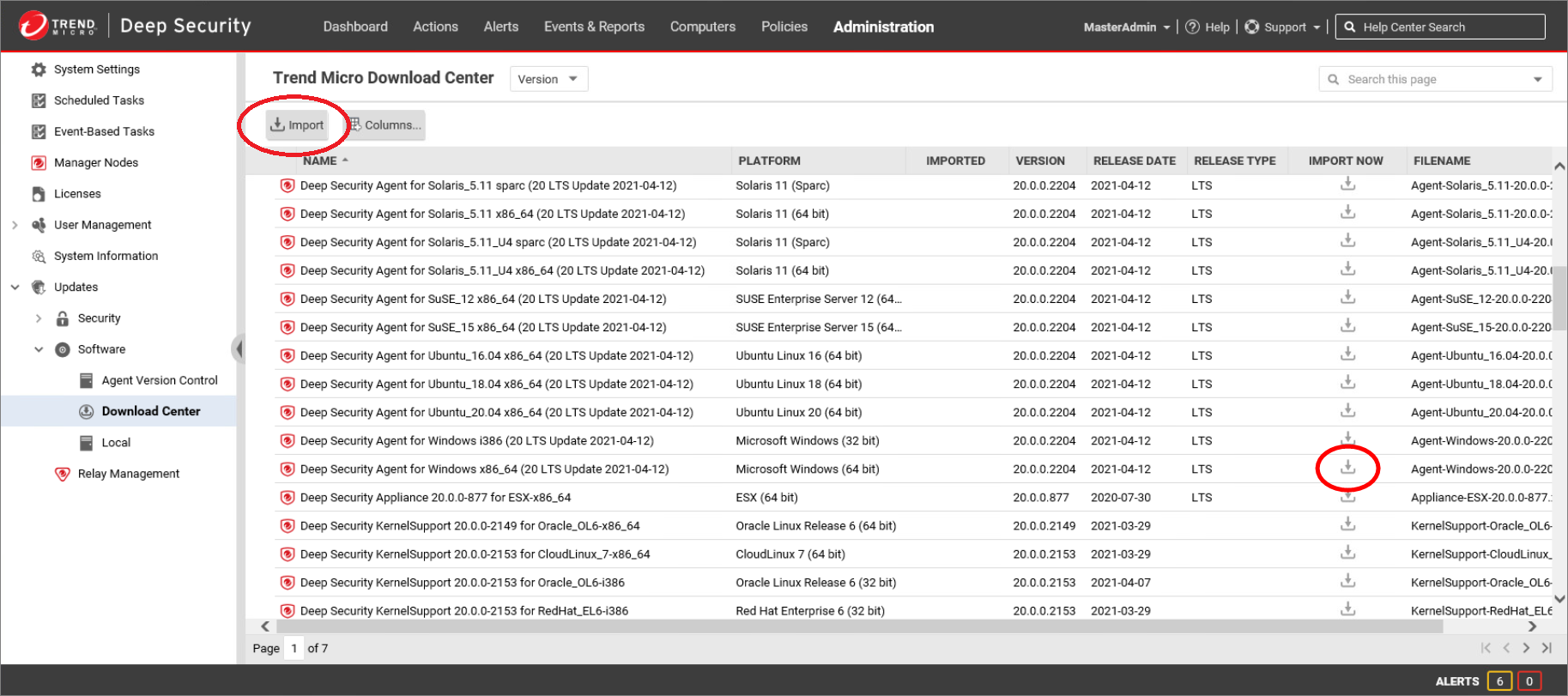
從清單中選取所需的 Deep Security Agent 軟體套件,並點擊清單頂端的 Import,或點擊 Import Now 圖示。Deep Security Manager 隨即開始從 Trend Micro Download Center 下載軟體。請為受保護伺服器所使用的每種作業系統匯入對應的軟體套件。
步驟 3
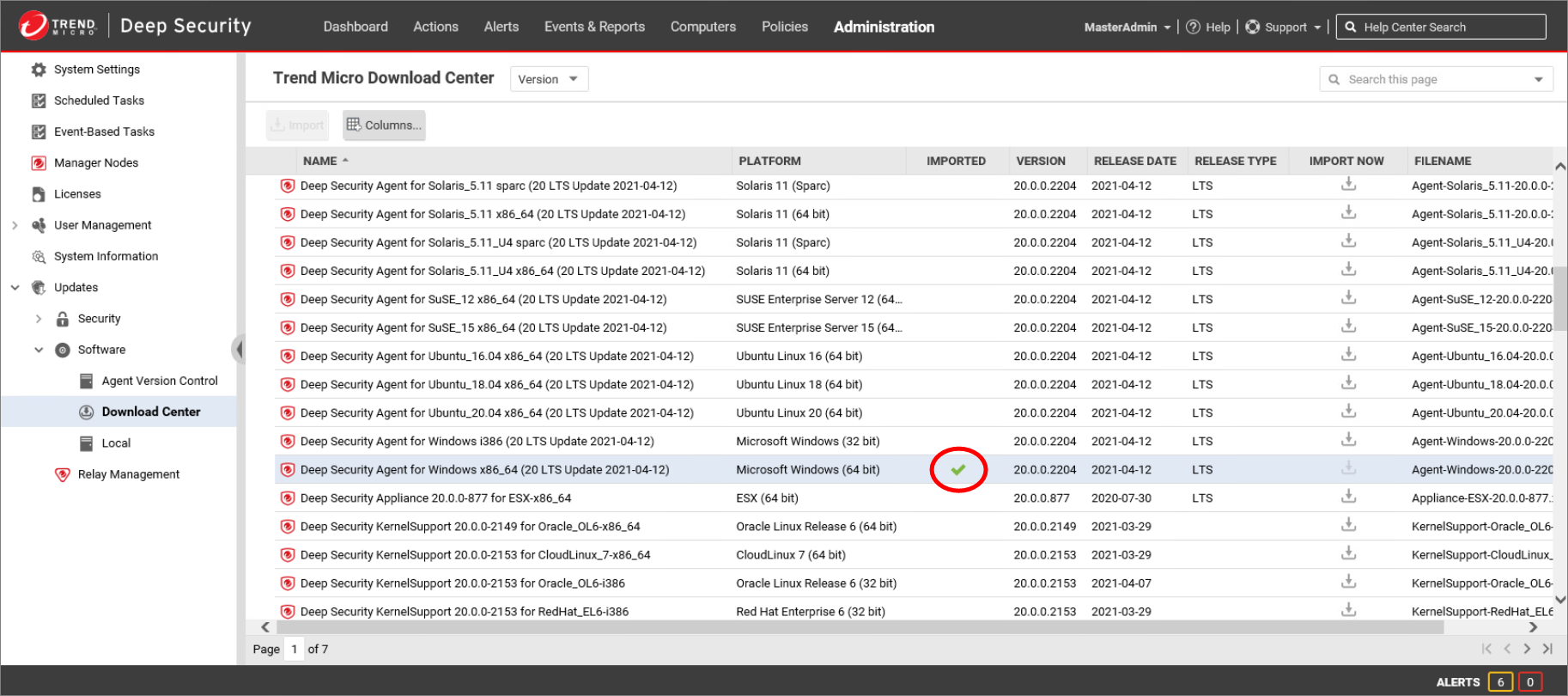
軟體下載完成後,所選 Deep Security Agent 的 Imported 欄位會顯示綠色勾勾。
步驟 4
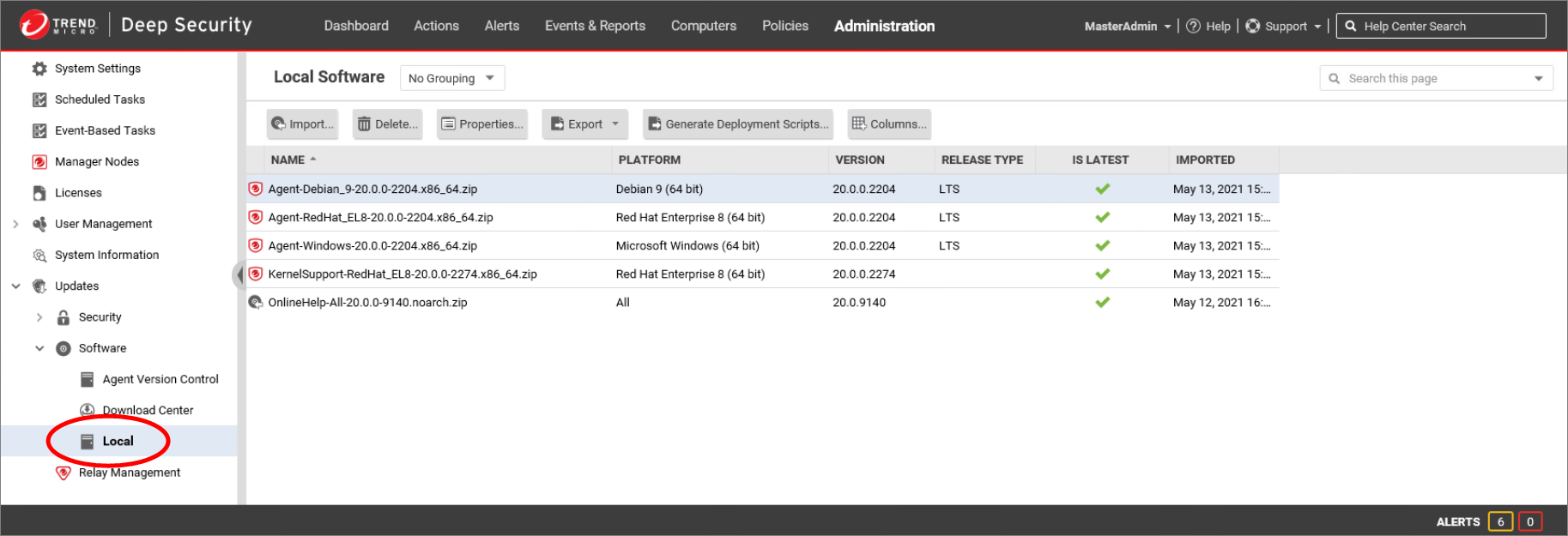
在左側窗格中點擊 Local。Local Software 頁面會列出所有已匯入 Deep Security 的軟體套件。
Is Latest 欄位會顯示本機軟體是否與 Download Center 提供的軟體版本一致。
版本
您可以透過瀏覽 Deep Security Manager 電腦上的下列資料夾,檢視 Local Software 中軟體套件的內容:
C:\Program Files\Trend Micro\Deep Security Manager\temp
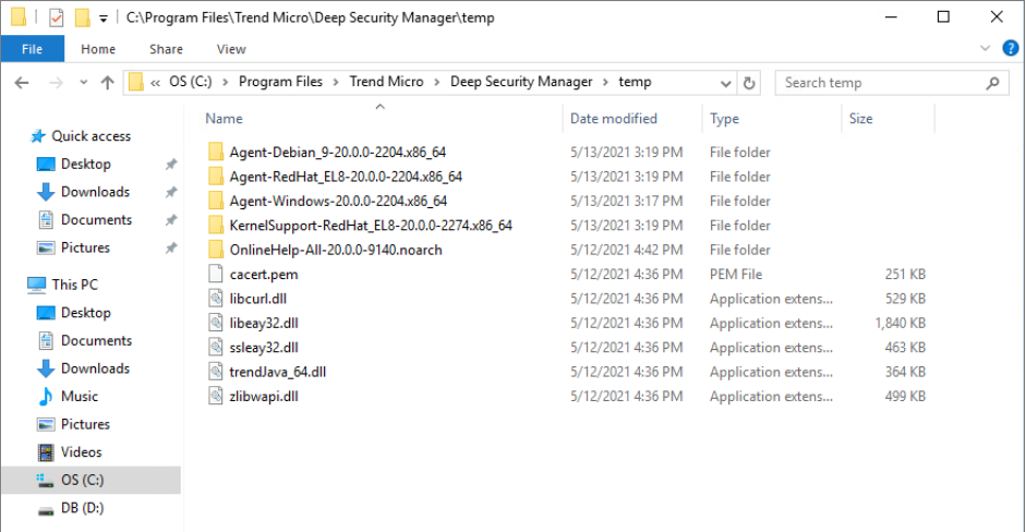
注意: Deep Security 會驗證 Deep Security Agent 套件的數位簽章,以確保軟體檔案自簽署時起未遭變更。
將 Agent 軟體匯入 Deep Security Manager
本影片示範如何將 Deep Security Agent 軟體套件匯入 Deep Security Manager。